A Python Developer's First Impressions of C
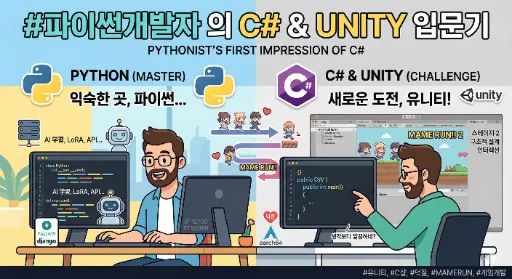
- My primary language is undoubtedly Python. I use Python for a wide range of tasks, including web application development, creating various local business applications, AI training and inference, and LoRA model generation.
- While not to the same extent as Python, I'm also proficient in JavaScript and C++. As someone who deals with web-related tasks most frequently, JavaScript is an unavoidable companion. I personally believe that, unless you're exclusively working with embedded hardware, there isn't a single developer in the world who hasn't dabbled in JavaScript at least a little.
To borrow a famous line from one of my favorite movies, I'd say, "JavaScript actually... is everywhere."
- C++ is challenging. However, when working with Linux, especially on aarch64 (arm64 architecture) machines, it's often necessary to build and port various packages and libraries manually. Furthermore, to compensate for Python's slower computations, most Python libraries are essentially C++ binaries simply wrapped for Python. Thus, for Python-centric Linux users like myself, there comes a point where you inevitably gain some familiarity with C++.
- The headache-inducing moment when you directly engage with C++ often revolves around memory management. I suspect this is where many aspiring C++ developers first encounter frustration. Pointers and garbage collection present significant hurdles for developers accustomed to the convenience of high-level interpreted languages.
Why I Started Using C#: Unity
I recently started working with Unity. As a fan of web and web browsers, I previously developed and deployed a 2D game that ran in a web browser. It was a 2D side-scrolling obstacle avoidance game called "MAME RUN!!", where players raced towards a goal.
The characters and narrative were based on the five members of "Mameshiba no Taigun," a Japanese idol group I admire and support. Driven purely by "fan devotion," I wanted to convey my support for them and spent three to four sleepless nights creating the game.
After deploying it, I uploaded gameplay videos to X and TikTok, which, surprisingly, garnered significant attention and interest.
I even received 'Likes' from the members of "Mameshiba no Taigun" themselves, and many people actually sought out and played the game. Hundreds of players engaged in a considerable number of play sessions. This response was quite refreshing and became a huge motivator for me.
However, the game I deployed, MAME RUN!!, was originally planned to have four stages and an ending. In reality, only Stage 1 was implemented. While part of me wanted to gauge player reaction before committing to more, the bigger factor was simply how exhausting it was.
This was because I built it using only Vanilla JavaScript and the HTML5 canvas feature.
I handled everything solo: planning, character design, obstacle design, background art, coin design, and other object designs. Crucially, I built the entire game engine myself using JavaScript.
From sprite animation logic, gravity logic, speed logic, game over logic, increasing speed over time, score calculation, UI interaction, collision detection, game over conditions, game over events, obstacle spawn logic, to random obstacle appearance logic – writing every single piece of gameplay logic from scratch was undeniably tiring.
However, after clearing Stage 1, I put a small UI message promising that Stage 2 would be coming soon. This promise to the players has since lingered in my mind as a "debt of responsibility," and this sense of obligation ultimately led me to start using Unity.
Fulfilling My Responsibility
However, I couldn't bring myself to touch that hellish JS engine again. Stage 2 and beyond involved even more features to implement, such as character special abilities and items.
Then, it suddenly occurred to me: wouldn't it be much easier to use professional tools like Unity or Unreal Engine, which already have core game features built-in? I had known about these tools before, but lacking C# experience and finding them somewhat daunting, I had simply thought, "I'll just wing it with familiar JS."
But my experience creating MAME RUN!! taught my brain that the 'pain of building from scratch' was far greater. As a higher-order animal (human), I began to consider better tools. Even if it meant diving into the C#/C++ jungle, I figured it had to be better than vanilla JS, so I chose Unity as my new partner.
Why Unity? Why Not Unreal?
Honestly, I hesitated when choosing a tool. A part of me wondered if Unreal Engine, which uses the slightly more familiar C++, might be a better choice.
'Eek... I'm... new to C#... (blushes)'
Nevertheless, I had clear reasons for choosing Unity.
-
Hardware Limitations: My workstation isn't top-tier. The best spec I have in an AMD64 environment is a 5-year-old i7-12700F + RTX 2060 combo. To minimize stress, I decided that the relatively lighter Unity would be a better fit.
-
Tool's Purpose: "Why use a sword meant for an ox to kill a mouse?" MAME RUN!! is a 2D game. My mental image of Unreal is strongly associated with AAA 3D open-world games like 'Assassin's Creed' or 'Red Dead Redemption 2,' making it seem overkill for a 2D game.
So, I installed Unity and gradually began to familiarize myself with it by consulting official documentation and tutorials.
My Impressions of C#
While there's much to say about Unity itself, I'll focus on the C# language for now, as the story would get too long otherwise.
Clean and Organized Feel
Because of its name, I expected C# to feel closer to C++. However, it actually felt much more similar to modern managed languages like Java or JavaScript, with a C-like syntax. The use of curly braces {} and familiar structures like if, for, class, and return made its first impression resemble JS.
For example, the superficial feeling is similar:
if (score > 10)
{
    Console.WriteLine("OK");
}
if (score > 10) {
  console.log("OK");
}
However, after using it a bit, C# gives a distinctly more organized feel than JS. It has a certain static quality that JS lacks. It's hard to pinpoint, but perhaps due to excellent IDE support, C# code often ends up being highly readable and well-structured.
It truly feels like a language competing with Java. Unlike C++, the convenience of not having to worry about extreme hardware control or memory management is a plus. Yet, it still compiles into binary for runtime, ensuring performance. This balance between performance and usability makes it a quite attractive modern language.
A Python Developer's Perspective on Indentation
The 'bracket hell' that many Python developers, accustomed to Python's indentation-based syntax, often feel when looking at JavaScript code... {}, ().
'Damn, where does this statement end? It feels like one closing brace is missing...?'
This feeling always arises when JavaScript code becomes a bit long and complex. Surprisingly, with C#, my impression was:
'It's quite clean and less constricting than I expected!'
Honestly, I'm not sure why yet. It might be due to the IDE (I'm using VS Code), or perhaps because, unlike JS with its complex asynchronous front-end logic, C# incorporates a static, backend-like structure into its code. It could also be that its 'strong type system (Static Typing)' and 'namespace-based structuring' unconsciously help developers visualize the code's architecture.
Conclusion
From a web developer's perspective, C# is quite an attractive language.
Because:
Constantly working only with FastAPI/Django/DRF in Python can weaken one's sense for large GUI applications, games, and real-time interaction. C# seems to fill this gap wonderfully. And when coupled with Unity, it provides an excellent experience for developing a sense of interaction, state management, events, and object structuring. Such experience will, in turn, positively influence web front-end and application design.
In essence, C# and Unity feel like they can help web developers mature their 'sense of structurally designing dynamic programs'.
And to be more honest, while I deeply aspire to work with C++ for performance reasons, C++ can be somewhat raw and tiring. C#, on the other hand, feels like a great language for learning systematic thinking without losing the fun.
That said, I wouldn't necessarily recommend C# to all readers. A programming language isn't about 'which one is better'; it's merely a tool for implementing one's thoughts and plans. I only started C# because I needed Unity.
Going forward, I plan to open a Unity category and topic on this blog to fill it with my experiences with Unity and C#.
If you're interested, please subscribe and follow this blog! The follow feature is available after signing up for the Mikihands blog platform. Registration is free and simple, so please sign up and follow.
Your interest and support are what motivate me to write posts.